
How To Ride
How to #RideDCTA in 5 Easy Steps
DCTA makes riding transit easy and convenient. Follow the five easy steps below to get you on your way.
Plan Your Trip
Use the Transit app or DCTA’s Trip Planner tool on our homepage to determine the best mode of transportation for your trip. You can also check out our Schedules & Maps to find times and route numbers and see whether you will need to make any transfers. Look at all the fare options to determine which one is the best for you. Getting to our train stations or bus stops is easy. Park your car or secure your bike at any of our A-train stations. You can also travel on the train or bus with your bike. And for your convenience, all of our A-train stations have connecting bus routes.
Purchase Your Fare
If you plan to ride the bus, you can buy your ticket using the GoPass℠ mobile app, with exact cash at the electronic fare box inside the bus, online or at a DCTA ticket outlet.
If you plan to ride the A-train, you can buy your ticket using the GoPass℠ mobile app, purchase your ticket online or purchase your ticket at a ticket vending machine located at our A-train stations.
Identify Your Train or Bus
Arrive at least five minutes before your scheduled departure time. Have your ticket or fare ready before boarding, and always check the route number or destination sign displayed on the front of the vehicle to ensure it is headed to your desired destination.
Boarding and Exiting
Before boarding, wait until the bus or A-train comes to a complete stop. Allow others to exit the vehicle. When boarding, watch your step, find a seat and enjoy the ride.
When exiting the bus, signal the bus operator about one block from your stop by pulling the “stop request cord” above the seats along the bus windows.
Always wait for the bus or A-train to come to a complete stop before boarding; then gather all your personal items, be courteous to others, and watch your step.
Arrive at your destination
If you need to transfer to another route or service to reach your final destination, make sure you coordinate your entire trip from the start for a seamless travel experience. If not, congratulations – you’ve made it to your destination!
Reading a Schedule
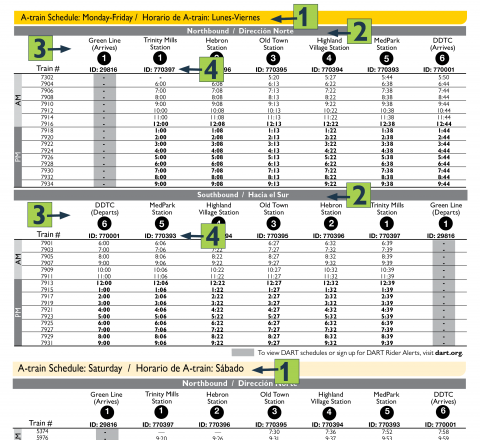
On the A-train map and route guide, stops and time points are arranged in numbers and columns, with PM stop times listed in bold:
- The day of travel is located at the top of the schedule
- This shows which direction the train is heading
- To read the train schedule, follow the time points from left to right
- Enter the six-digit Stop ID numbers on the schedule into the Transit app to get real-time schedule information
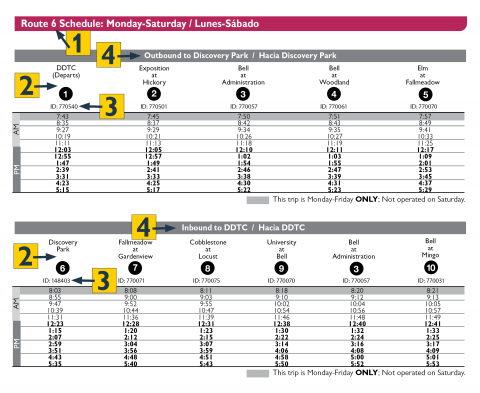
Stops and time points on DCTA route guides are arranged in numbers and columns, and PM stops are noted in bold. The first AM trip (highlighted light gray) is Monday-Friday ONLY.
- This route number will appear on the sign above the bus windshield and on the rear of the vehicle
- These stops are known as time points. Each schedule lists time points for several stops along the route, and these are shown on the accompanying route map. Read the schedule from left to right. To know when you should arrive at a stop that is between the listed time points, use the time from the time point before your stop
- Enter the six-digit Stop ID numbers on the schedule into the Transit app to get real-time schedule information
- This shows which direction the bus is heading
Use the Transit app anytime to create personalized trip plans, customized schedules and find the nearest DCTA stop to your location.
[Headline Full Bleed] Need More Assistance?
[image: DDTC CX] Just call 940.243.0077 any time Monday through Friday from 7 a.m. to 7 p.m., or on Saturdays from 8 a.m. to 4 p.m. DCTA’s Customer Experience Coordinators are ready to help you get where you want to go.
Rider Code of Conduct
DCTA has established conduct guidelines to help ensure the safety, security, comfort and convenience of all those who use DCTA vehicles and facilities. Customers not in adherence with these guidelines may be asked to leave the vehicle or facility immediately.
- Shirts and shoes are required
- No food or drink is allowed on DCTA vehicles unless in closed, spill-proof containers
- No unauthorized use of a DCTA facility or property for non-transportation-related purposes
- No unauthorized presence on a DCTA vehicle, facility, or property after hours of operation
- Service animals are allowed on DCTA vehicles. Non-service animals are also allowed, but must be in a pet carrier specifically designed to transport animals. The carrier may not be opened on the bus, must be leak-proof and well ventilated, and be small enough to fit on the owner’s lap or on the floor space in the immediate area of the owner without blocking the aisle
- No profanity, disruptive, or threatening behavior
- Use headphones when playing music
- Turn off cell phone ringers and speak at a low volume
- Smoking or chewing tobacco in any form, including electronic cigarettes or vaporizers, is not allowed on DCTA platforms, at DCTA bus stops, or inside DCTA vehicles or facilities
- DCTA does not allow unlawfully carried handguns, weapons, or any other items intended for use as a weapon in or on any DCTA facility or vehicle
- Explosives, car batteries, flammable liquids, or other materials considered hazardous by the U.S. Department of Transportation are not allowed in or on any DCTA facility or vehicle, except as authorized by DCTA
- Any unusual packages or suspicious activity should be reported to authorities or DCTA personnel immediately
If you need to request reasonable modifications or accommodations, please contact DCTA Customer Service at (940) 243-0077 or email info@dcta.net.